Showing posts with label Useful. Show all posts
Thursday, July 7, 2011
How To Haggle Like Your Old Man
The Art of Manliness listed out the top tips for any soon-to-be-haggler. The one rule that really resonated with me was: "if someone loses, you did it wrong."
Don’t try to be the victor. Avoid zero-sum games where someone else has to lose in order for you to win. If you negotiate like that, you’ll probably win a few, but you’ll lose just as many and kill a lot of good relationships along the way. Instead, find a way for everyone to win.
I'm definitely using this tip next time I'm at a crossroads with someone in a meeting. You can read the full list as well as a few nice anecdotes here.
Sunday, April 10, 2011
Google Social Search
Leverage your social networks (i.e. Twitter, Facebook, Blogger, etc.) when searching for things on Google. All you need to do is link your google profile to your networks and you'll receive relevant results from your social circles. You can read more about it here.
Friday, April 9, 2010
Friday, February 12, 2010
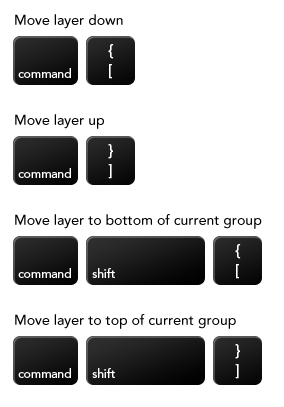
Photoshop Shortcuts
I don't really use photoshop that often, but I'm all about shortcuts. Smashing Magazine has a list of some uncommon, easy to read shortcuts for photoshop here.
Monday, November 16, 2009
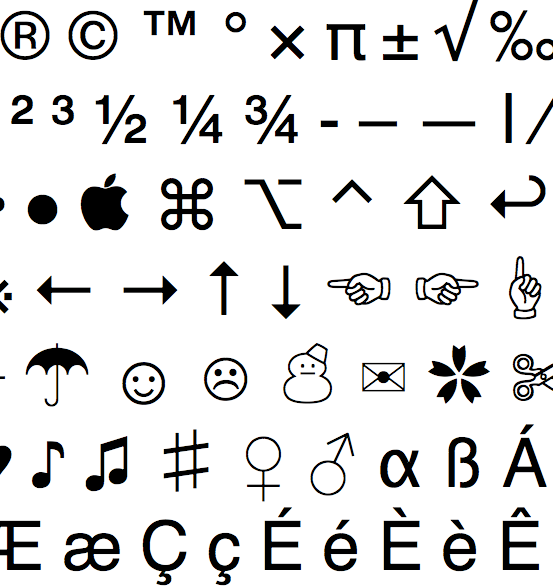
15 Useful Guides
Make Use Of has put together 15 free guides that teach you some really interesting stuff. Some of the guides include mac shortcuts, iphone hacks, how to use bit torrents, creating computer networks, beginner's linux, and how to build your own PC. Each guide is a downloadable PDF.
Tuesday, September 29, 2009
Saturday, August 29, 2009
Brands of the World
Saturday, May 9, 2009
Wednesday, April 29, 2009
Paint with Bob Ross
Tuesday, April 28, 2009
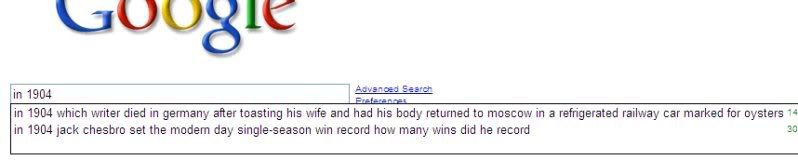
Control Google
Take control of what people see when they decide to be a creeper and google your name. This can be a huge plus when employers decide to look you up. Six Pixels of Separation tells you how:
According to The Official Google Blog yesterday on the post, Search for "me" on Google, you can fill out your own personal profile and have it actually rank on the first page of search results for your own, personal, name.
You get quite a bit of functionality when filling out your profile, including the ability to add as many professional links, your photo, it seems to be pulling a mini-photo stream from Flickr as well, and you can even connect to those that may be interesting to you. No, it's not quite as robust as LinkedIn. The point is not for this to be J.A.O.S.N. (Just Another Online Social Network). The point is to make people more searchable and findable in the Google engine.
You can read the rest here
Friday, April 3, 2009
Useful File Conversions
How about converting InDesign to a Word Document? Creativetechs.com has some links and tips to make the process easy for you. I know I've had to do this at least a couple times this year alone.
Need a presentation but no access to Powerpoint? No worries, 280slides.com, has a free slideshow maker. There's no software needed and it has all the amenities of PPT +more. It's all online and free, for now. So check it out. I hope this stuff is useful to you guys.
Wednesday, March 11, 2009
Screentoaster
You know those instructional videos where someone is showing you how to do something directly on their computer screen? Screentoaster has free software available that lets you create these videos and upload them onto youtube or download them as a .AVI file. I don't have a use for it yet, but I'm sure I'll find one soon. If this didn't explain clearly enough what a screen toaster really does, go ahead and check out the site. Maybe you'll find a use for it. Thanks to swissmiss.typepad.com.
Subscribe to:
Posts (Atom)